Has your site moved to La Trobe’s new Design System (DS)?
The Design System helps make La Trobe’s website and all sub-sites consistent in their design and layout of information.
DS components can be used in the Content Management System (CMS) to present your site information more clearly, break up large areas of text and make information more accessible to users. The DS also ensures users have similar brand and design experiences with all University interfaces. View examples in our DS component library.
Here’s some examples of the DS components with guidance on how they can be best used to enhance your site’s landing page.
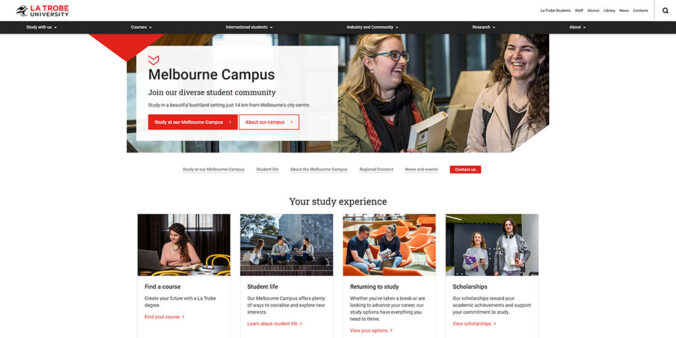
DS hero banner
The DS hero banner component introduces your site to your audience. Use a strong, LTU branded image that visually describes your area’s core business to engage users. Your site’s title and subheading should also describe what your area does. You also have the option of a ‘learn more’ click through button to lead users to more information on other pages in your site. The DS hero banner should only be used on your site landing page.
Example: DS hero banner
Card set
The DS card set component features between two and twelve boxes or cards that can be used to group information in a clear way to help users navigate content. This component includes an optional image, heading, description and call to action text and link and is useful to categorize information that can be displayed in an ordered way on your site. It might be tempting to overuse this component, but we recommend using a maximum of four to eight cards per page.
Example: DS Card set
Links list
The DS links list component can be used to categorize lists of information that lead to more information on additional content pages. You can arrange the DS links list in one or two columns, with the option to also add an image. This component is the perfect way to neatly present your subpages and link off to other areas of your microsite.
Example: DS Link list
DS Logo showcase
If you have partner logos or schools, departments and services logos you want to display on your site, the DS logo showcase is a great component for this. It can be used at the bottom of the page as a co-branding signoff.
Example: DS Logo showcase
See our previous blog Welcome to La Trobe’s Design System (Wedgetail) to get an overview of other DS components.
Be inspired by these current landing pages
View these engaging and informative DS landing pages managed by some of our web editors:
- Violet Vines Marshman Centre for Rural Health Research
- Become a graduate researcher
- La Trobe’s alumni community
Have questions about your web editing?
Remember, we’re always here to help! To reach out, please: